Tally budgeting and forecasting: turn accounting exports into forecasts, budgets, and scenarios
Accounting systems are great at recording the past planning needs a model that updates as reality changes. This pillar shows how to use your accounting data (and the right workflow) to build rolling forecasts, budgets, and scenario packs without spreadsheet sprawl.
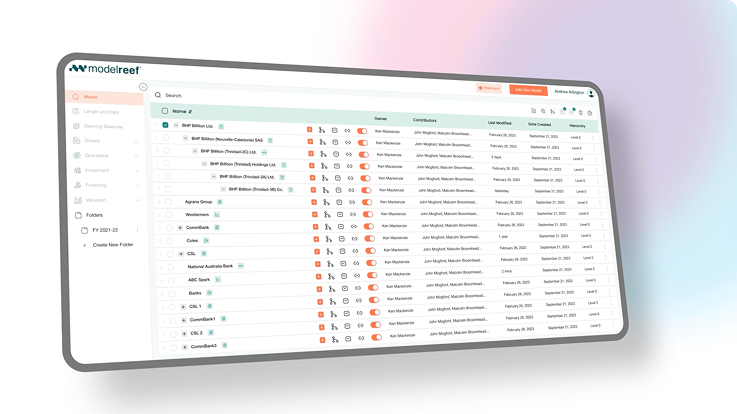
From setup to board-ready outputs
These articles cover the practical steps: exports, mapping, model structure, and how to keep forecasts current with minimal manual work.

Tally Budgeting and Forecasting: Build Budgets, Forecasts, and Scenarios in Model Reef from Tally Exports
View articles

Business Forecasting: Build Board-Ready Forecasts From Tally Exports in Model Reef
View articles
Difference Between Budget and Forecast: Examples for Tally Users in Model Reef
View articles
Zero-Based Budget Definition: Templates, Pros/Cons, and Scenarios (Tally Export → Model Reef)
View articles
Capital Budgeting Process: Evaluate Projects Using Tally Actuals in Model Reef
View articles
Inventory Valuation Methods: Model Inventory + Margin Impacts From Tally Exports
View articles
Forecasting Accounts Payable: Build an AP Calendar and Cash Flow Forecast From Tally Exports
View articles
Budgeting Software vs Tally: Accounting vs Planning for Forecasts, Scenarios, and Reporting
View articles
Advantages of Budgeting: How to Turn the Theory Into a Working Model With Tally Data
View articles
Budgeting vs Forecasting: Which You Need (and How Model Reef Connects Both for Tally Users)
View articles
Start here: the most practical implementation guides
If you want to go from zero to a working workflow quickly, start with these.
Business Forecasting: Build Board-Ready Forecasts From Tally Exports in Model Reef
View articles
Difference Between Budget and Forecast: Examples for Tally Users in Model Reef
View articles
Budgeting Software vs Tally: Accounting vs Planning for Forecasts, Scenarios, and Reporting
View articlesRelated pillars for planning workflows
These pillars expand on budgeting, forecasting, and reporting foundations that complement the integration-specific guides.
Xero Budgeting and Forecasting: Build Driver-Based Plans in Model Reef (OAuth Integration)
View articles
QuickBooks Budgeting: Build a Driver-Based QuickBooks Budget & Forecasts in Model Reef
View articles
Sage Forecasting & Budgeting: Build Driver-Based Plans from Sage Exports in Model Reef
View articles
FreeAgent Cash Flow Forecasting: Build Rolling Forecasts and Scenarios in Model Reef from Exports
View articles
How to Use QuickBooks: Step-by-Step Workflow for Faster Close, Cleaner Books, and Better Decisions
View articles
Explore More From Model Reef
Learn by watching - Model Reef tutorials
Short, focused videos that show you how to go from raw data to live, structured financial models.
Getting Started
Learn the fastest way to import data, map it correctly and compile your first working model - in minutes.
View Getting Started Tutorials
Model Structure
See how a well-organised model is built - branches, categories, naming, and structural conventions that scale.
View Model Structure Tutorials
Drivers, Variables & Formulas
Understand how drivers, vehicles, and formulas work together so you can build dynamic, reliable forecasts.
View Driver & Formula Tutorials
Variable Types
Understand how Master revenue, COGS, opex, staff, tax, assets, liabilities and equity variables - and how each flows into the statements., variables and formulas work together so you can build dynamic, reliable forecasts.
View Variable Type Tutorials
Charts, Reports & Scenarios
Learn how to create dashboards, reporting packs, comparisons and scenarios for investors, boards and clients.
View Reporting & Scenario Tutorials
Collaboration & Governance
Share models confidently with roles, permissions, branches and clean workspace organisation built for teams.
View Collaboration TutorialsHelp Center
Find answers fast - from setup and integrations to advanced modelling and collaboration.
Use Cases
See how Model Reef is used for SaaS, retail, multi-entity consolidation, funds, project finance and more.
Browse all use casesHelp Articles
Step-by-step guides for importing data, building models, and understanding outputs.
Open Help ArticlesSyntax
Field-level explanations: variables, drivers, timing, formulas and charts.
Explore Syntax ReferenceHow Tos
Task-based recipes: build a DCF, consolidate entities, set up economics and dashboards.
Browse How TosDiscover the Tools Behind Model Reef
Every feature you read about in Articles - from integrations to dashboards - runs on Model Reef’s automation engine.
Explore the technology that keeps your models fast, reliable, and connected across every workflow.
Looking for More?
Discover how teams use Model Reef to collaborate, automate, and make faster financial decisions - or start your own free trial to see it in action.
Want to explore more? Compare plans .
Trusted by clients with over US$40bn under management.